


The QuickBooks system is among the best, allowing users to create deposits and payments automatically. But during payroll updates, some users encounter the QuickBooks 12000 Series Error.
When users encounter errors with the QuickBooks 12000 series, there must be connection issues. The 12-series error message pops up when a user tries to take any action that requires an internet connection, such as downloading software or using payroll update services.
Table of Contents
Causes of 12-Series Error in QuickBooks System
Common causes of the 12-Series Error in QuickBooks should be analyzed to understand how to troubleshoot it.
- A “Timed out” error in your QuickBooks software is a 12000-series error caused by a QuickBooks server connection issue.
- This issue occurs if you have an expired QuickBooks Payroll service subscription.
- A firewall blocks access to a port required to reach the QuickBooks server.
- You should understand that if you are using something other than Internet Explorer, then your error occurred from that reason.
We always recommend identifying the root cause of errors in QuickBooks to resolve them.
Quick Safety Steps Before Performing Results
You should follow the following safety steps before applying the solutions to fix the QuickBooks 12000 Series Error:
- You should always back up your company file.
- Make sure to check your internet connection.
- It is crucial to run QuickBooks as Administrator.
- Turn off the firewall or antivirus temporarily.
- Always check for corruption in the company file, QB files, QB support files, or the tax table that may be preventing the update.
Once these safety steps are followed, your system should be ready for normal operation.
Resolutions for the QuickBooks Error Series 12XXX
There are many methods to fix QuickBooks Error Series 12XXX. A few of them are described in detail below.
Solution 1 – Modify the Windows Firewall Configuration
The firewall tends to block activities by programs installed on the system to protect the system’s data. You need to perform the steps given below:
- Begin by opening the Start menu
- Then, search for “Windows Firewall.”

- Click on advanced settings.
- Right-click in this section and choose New Rule.
- Find and select the QuickBooks executable from the given list.
- Then repeat this step for each QuickBooks file listed.
- After clicking Next, select Allow the Connection and click Next again.
- Finally, name this rule accordingly.
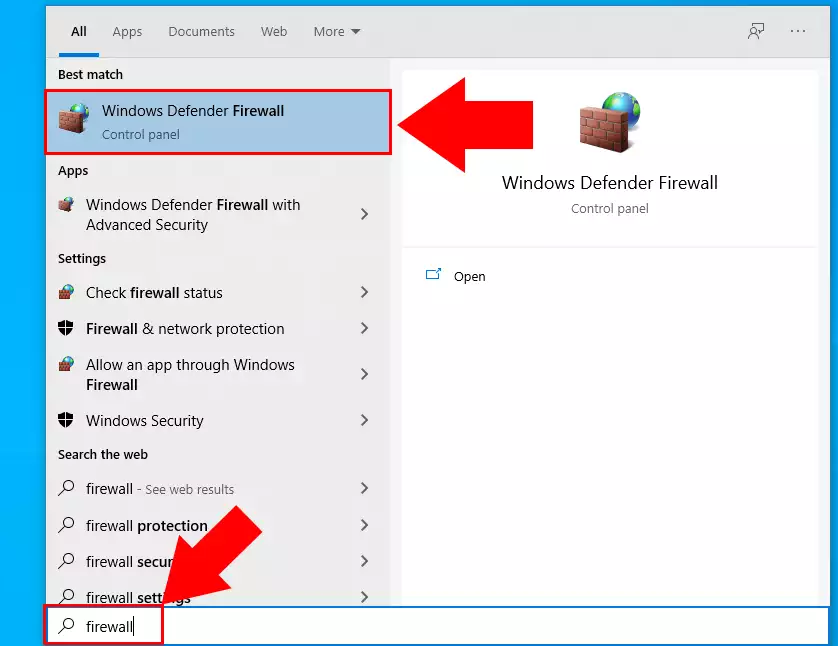
Wait a while for the process to be finalized. If you’re still having this issue, move on to the solution.
Solution 2 – Move to Another Network or Turn Off Your VPN
Certain Wi-Fi networks restrict access to QuickBooks servers, so you should do this step-
- Log out of your existing Wi-Fi network
- Log into another network (mobile hotspot is preferred)
- Turn off your virtual private network
- Launch QuickBooks and attempt to update once more
Consider this solution as an important fix for your error.
Solution 3 – Always Activate Your Payroll Subscription
To activate the Payroll table in QuickBooks Desktop, you need an active payroll subscription. Hence, always check whether you have an active payroll subscription.
- Log in to QuickBooks Desktop as an administrator
- Next, proceed to Employees and click on My Payroll Service.

- Click on Activate Direct Deposit.
- Log in to your Intuit account.
- Enter the Payroll PIN and click Ok.
- Ensure your payroll status is active.
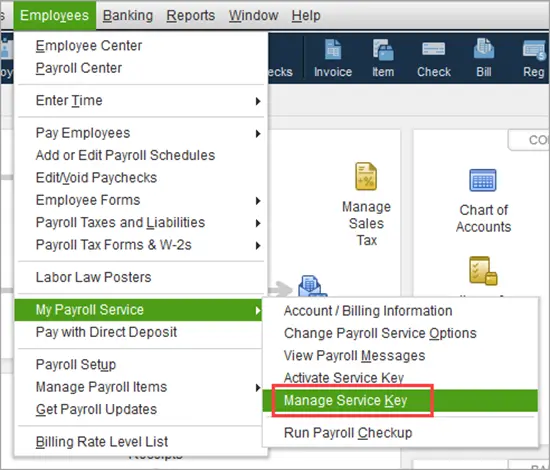
Once the steps are complete, run QuickBooks payroll updates again and see if the problem is resolved. Check the next method if you still face the issue.
Solution 4 – Make Sure To Check Your Antivirus Settings
When the antivirus detects the application as a threat, there is an increased risk of being unable to access the internet or perform its intended functions. Additionally, there will be no way to obtain payroll updates until the antivirus marks the website as trusted. This is how you get error 12000 in QuickBooks Payroll.
Make sure that the websites and the programs of QuickBooks are marked under trusted programs in your antivirus settings.
Let’s discuss all the Errors associated with the 12000 series.
- Error 12001: It’s a connection timeout error in which the program can’t connect to the server as a result of a slow or blocked internet connection.
- Error 12002: This error is caused by a network timeout or disconnection. It is also caused by firewall issues or a lack of connectivity.
- Error 12007: In this error, QB fails to connect to the internet. It is commonly caused by DNS issues or blocked access.
- Error 12009: This error is caused when the program can’t connect securely to the server. This issue commonly occurs due to incorrect SSL/TLS settings.
- Error 12029: This is a blocked network timeout or disconnection error that is caused by servers being inaccessible to QuickBooks.
- Error 12031: The program has failed to connect due to a connection timeout. As a result of slow internet or server problems.
- Error 12037: This error is caused when QuickBooks can’t connect as a result of a network disconnection. This is mainly caused by firewall or proxy issues.
- Error 12038: The QB error 12038 is usually caused when the update is unsuccessful due to an inability to download the necessary files. It normally occurs due to a security issue or an unstable internet connection.
- Error 12039: This error occurs when QB is unable to complete or start the download process. This typically happens due to internet interruptions or blocked ports.
- Error 12041: You might encounter this error when QB fails to update the payroll due to connection issues. This is commonly associated with incorrect system setup.
- Error 12045: Error 12045 happens when you are unable to verify the digital signature, this causes due to security and certificate issues.
- Error 12152: This error occurs when the program cannot verify the server because of SSL configuration errors. Normally, this happens due to outdated or disabled protocols.
The Final Note To Avoid QuickBooks 12000 Series Error
Here, we will discuss the final steps to prevent QuickBooks Error Series 12XXX.
- Just make sure of stable network connectivity and correct file permissions, specifically in multi-user setups.
- Always keep your QuickBooks up to date to reduce such errors.
- For users using QuickBooks Payroll, ensure it is activated and properly configured.
You must go through the tips mentioned above to avoid this issue.
Quick View Table for 12-Series Error In QuickBooks
Let’s have a quick look at the points we discussed above:
| Error Description | QuickBooks errors, such as error 12000, often occur during updates or when using QuickBooks Payroll online services.This means the issue is not with the business file but with the network connection, firewalls, and other settings. |
| Causes | QuickBooks errors, such as error 12000, often occur during updates or when using QuickBooks Payroll online services. This means the issue is not with the business file but with the network connection, firewalls, and other settings. |
| How can you fix it? | QuickBooks error series 12XXX can be resolved by ensuring a stable internet connection. Also, your firewall/antivirus settings need to support QuickBooks access. Furthermore, QuickBooks and QuickBooks Payroll need to be updated. |
Conclusion
We have tried to explain QuickBooks Error 12000 Series. For this, we have covered different segments, such as the causes and the resolutions. If you are still confused about what to do, then don’t waste your time and instantly connect with our specialized team for effective solutions.
Frequently Asked Questions
Is it necessary to reinstall QuickBooks Desktop to fix the 12000 Series Error?
No, there is no need to reinstall QuickBooks Desktop to fix the 12000 series error. It is more connected to the internet connection or firewall settings. It should be fixable by making some changes to your network or security settings.
Does the firewall also cause the 12-Series Error in QuickBooks?
Yes, the firewall also causes the 12-Series Error in QuickBooks. The reasons are as follows-
Blocks internet access: The firewall might prevent QuickBooks from connecting to the internet by blocking its internet access capability.
Prevents server communications: It prevents communication between QuickBooks and Intuit servers, so it fails to update successfully.
Disrupts payroll updates: This results in an inability to update QuickBooks Payroll software and causes 12XXX errors.
Prevents required ports: A firewall may block the required ports necessary for successful secure communication.
Triggers connection time-out: This will lead to connection time-outs, causing various errors such as 12001, 12029, and so on.

Peter is a Certified Public Accountant (CPA) with a strong background in public accounting and accounting technology. After starting his career as an audit senior, he worked with organizations across various industries and gained hands-on experience with complex accounting standards. At ProAdvisor Solutions, Peter helps clients navigate new accounting requirements. His goal is to simplify processes, improve accuracy, and boost confidence in finance reporting.