


If you are unable to establish a connection between the bank and QB, it may be because of QuickBooks error 179. This error can occur when users enter incorrect login credentials or access the account on multiple systems. It can prevent you from accessing your bank account and its transactions. A quick hack you can try is to clear the browser cache or log out of any other sessions you are logged into.
However, often a mult-step approach might be required. In this blog, we will cover the reasons you may encounter this error and the troubleshooting steps you need to carry out to resolve it.
If you need any help connecting your bank account to your QuickBooks account, feel free to contact experts.
Table of Contents
Possible Reasons Due to Which QuickBooks Error 179 Occurs
One reason for the error may be the browser’s cache and cookies. Let’s go through all the potential causes behind the QuickBooks error 179:
- Incorrect login credentials to access QuickBooks
- When you haven’t updated the bank login details in QuickBooks
- If you are trying to reconnect the account in QuickBooks and you are logged in to the bank account from multiple devices
- If the company file is damaged or corrupt
- When you are using incorrect bank credentials
Now, let’s move on and review the key considerations when fixing this error.
Things to Keep in Mind While Fixing QuickBooks Error 179
We will go through the things to ensure before you move on to the troubleshooting methods.
- Check for the bank username and password.
- Ensure you are using a stable and secure internet connection.
- Update the QuickBooks Desktop to the latest version.
- Check the bank server.
- Ensure that you are not logged in to the bank account from any other device.
- Check if you have selected the correct bank account in the QuickBooks Online account.
- Keep your data backup safe to avoid data loss.
Now, let’s move on and understand the methods to use to fix the error 179 in your system.
Powerful Troubleshooting Methods to Fix QuickBooks Error 179
In this section of the blog, we will talk about the methods that will help you tackle the error. Go through the solutions listed below in order and carry out the steps as instructed.
Solution 1: Clear Browser Cache and Cookies
When you are working with QuickBooks Online, and the web page won’t load or takes too long, clear your browser’s cache and cookies from the settings, following the steps for your browser.
Mozilla Firefox
- From the top right corner, click on the menu option.
- Choose Settings.
- Then tap on the Privacy & Security.
- From the Cookies and Site Data section, tap on Clear Data.

- Now, from the drop-down menu beside When, choose Everything.
- Click on the Temporary cache files and pages option.
- Lastly, tap on Clear.

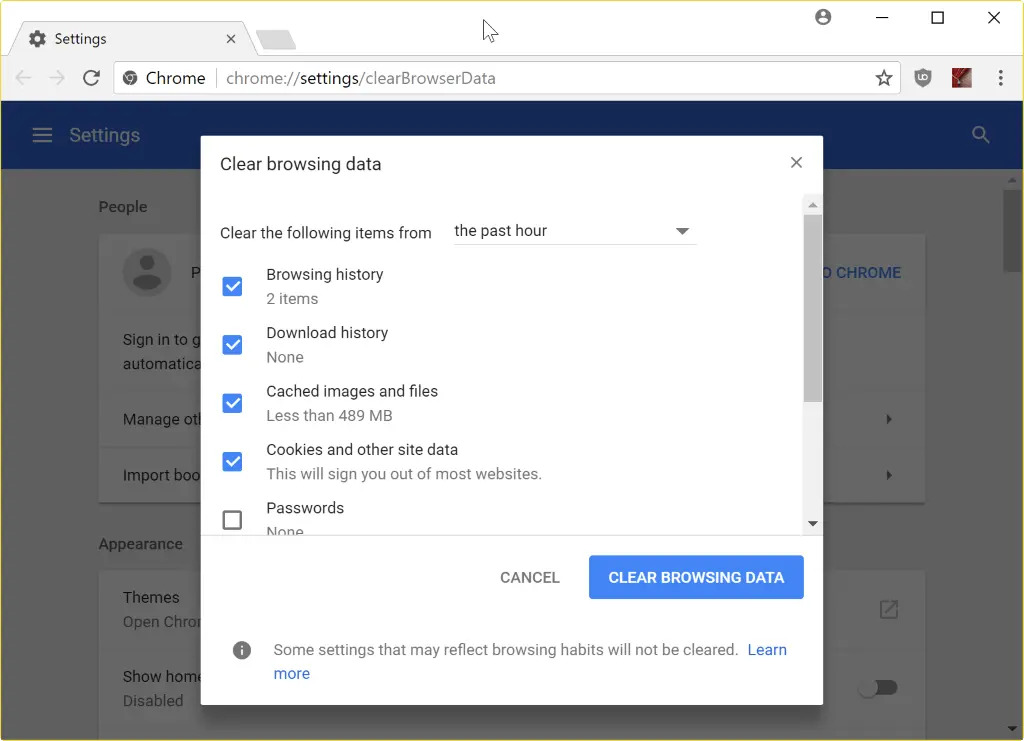
Chrome
- From the top-right, tap on More.
- Then choose Delete browsing data.
- Select a time range, such as Last hour or All time.

- Choose the types of information you wish to remove.
- Tap on Delete Data.
Safari
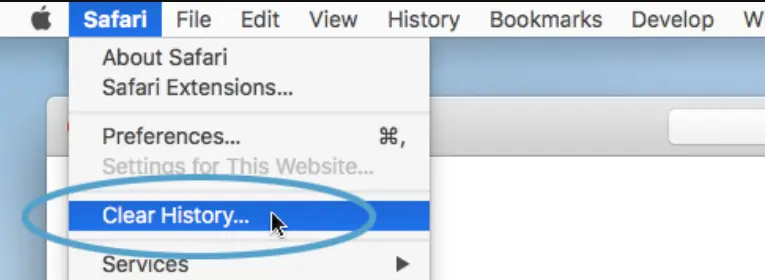
- Access the Safari app on Mac.
- Tap on the History option.
- Then choose the Clear History option.

- From the pop-up menu, select the time range to delete the browsing data.
Microsoft Edge
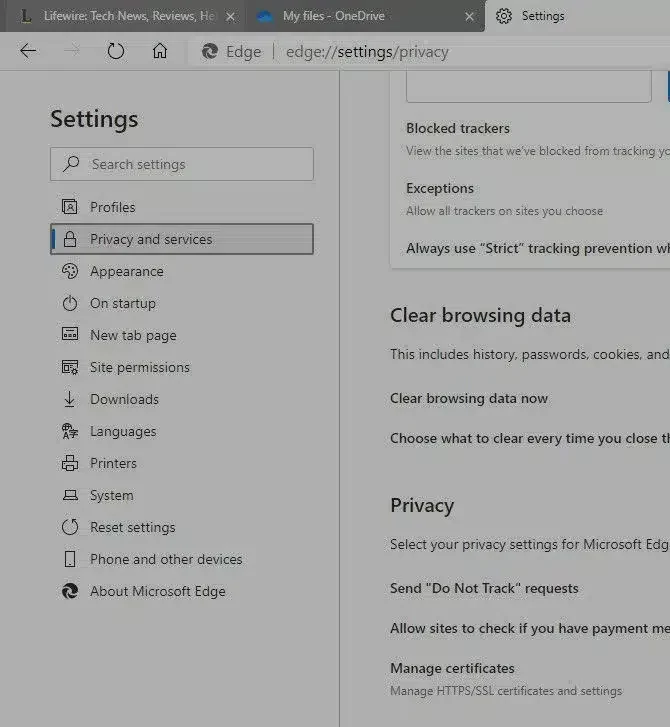
- Choose the Settings and more option.
- Then, choose Settings.
- Tap on Privacy, search, and services.
- Tap on the Clear browsing data option.

- Select Choose what to clear next to the Clear browsing data now section.
- From the Time range column, select the time range from the drop-down menu.
- Select the types of browsing data you wish to clear.
- Tap on Clear Now.
After you have successfully deleted the cache and cookies for your browser, check if the error persists.
Solution 2: Check the Banking Credentials
You are required to verify the details for your bank. Here’s how you can do it:
- Access your browser.
- Then, head to the bank login page.
- Enter your login credentials and tap Sign In.
- Check that you can log in successfully, then update your login credentials.
- If the login details are incorrect, then reset the password.
This will ensure you log in as the correct user. It is also required to update the banking details to access QuickBooks.
Solution 3: Update the Bank Login Details
Updating the bank information can help you resolve QuickBooks error 179 on your system.
- Access the QuickBooks Online.
- Choose the Banking option from the Banking Panel.
- Select the account for which the error occurs.
- Tap on the Edit icon.
- Then, select the Edit Sign-in Info and enter the login details.
- Tap on Update and try to reconnect the account.
The following steps will help you update the banking details and fix the error 179 for QBO.
Solution 4: Repair the Windows Registry
The registry files store and manage QBDT’s operations and settings. There is a chance that an issue with these files is causing you to receive error code 179 in QB. Here’s how you can fix it.
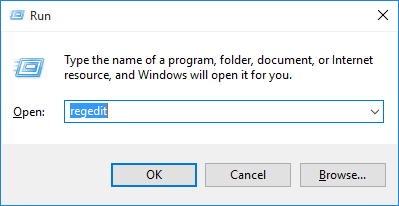
- Press Windows + R on the keyboard to launch the Run command.
- Type regedit and access it.

- To export the backup, right-click on the backup of the whole registry.
- This will create a copy of the QuickBooks files in the backup folder with a .reg file extension.
- Restore the .reg file from the Registry Editor.
Reopen QuickBooks and check if the error still shows up.
Solution 5: Use the QuickBooks File Doctor
First, to use the file doctor, download and install the QuickBooks Tool Hub.
- Access the Tool Hub in your system.
- Go to the Company File issues tab.

- Tap on the QuickBooks File Doctor and let the tool scan.
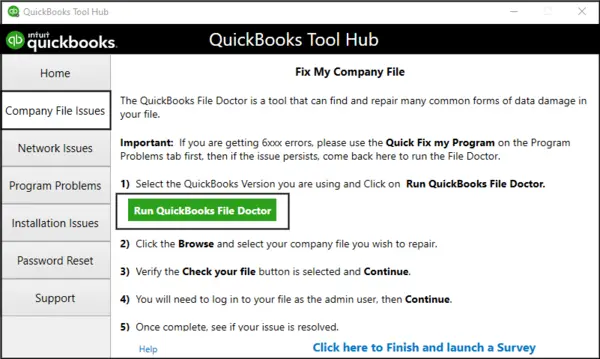
Once the tool has fixed the issues, try accessing your bank account data and check if the issue is still present.
Solution 6: Use the QuickBooks Backup Key
To help you fix the QuickBooks error 179, you can restore the backup key by following the steps below:
- Go to the Start bar.
- Search for and open the Command Prompt.
- Now, type regedit and hit Enter.
- From the Registry Editor window, locate QuickBooks error 179.
- Choose the Export option.
- Now, select the QuickBooks Backup Key from the folder.
- Tap on OK.
Now, the key will update it automatically and fix the error in your system.
Solution 7: Update the Financial Data
QuickBooks Desktop cannot process operations on the bank account if the information is incorrect. So, check and verify if the data you entered is accurate and matches the banking data.
- Access the QuickBooks Desktop.
- Go to the Tools tab.
- Select the Online Center option from the menu.
- Choose the Financial Institution that is your bank.
- Hit Ctrl+F3 on the keyboard to select the Contact Info.
- Now, mark the profile as needing an update and update the required fields.
- Tap on the Update/Send option.
- Input the password when asked.
- Select the Update Now option.
- Now, log in to the bank account and check the data you entered.
The steps mentioned above will help you update the banking information in QuickBooks and avoid error 179.
Solution 8: Access the QuickBooks in Private Mode
By using the QBO in incognito mode, you can tackle the error that is bothering you. For different browsers, here are the shortcuts to launch it.
- Safari: Command+Shift+N
- Mozilla Firefox: Ctrl+Shift+P
- Google Chrome: Ctrl+Shift+N
- Microsoft Edge: Ctrl+Shift+N
Use the shortcuts to switch to incognito mode, and now try accessing the bank details.
Expert Tips to Use to Prevent QuickBooks Error 179 in the Future
When you have overcome the error in your system and don’t want to face it again in the near future, here are the pointers you should ensure.
- Use the correct username and password to access the bank account.
- Don’t log in from multiple devices simultaneously.
- Clear the browser cache and cookies to avoid QuickBooks error 179.
- Use the updated version of QBDT.
- Check the bank server.
- Ensure you use a stable, secure internet connection.
Ensure to keep these pointers in mind for your QuickBooks Desktop or Online version.
A Quick View for QuickBooks Error 179
Let’s now go through an overview of what we have talked about in this blog on the particular error.
| Description | QuickBooks error 179 prevents the user from accessing QuickBooks Online. The error blocks the user from accessing the bank account data. |
| Causes | The reasons behind the error can include logging into the bank account with incorrect credentials, using incorrect login details for QuickBooks, or using the bank account on multiple devices. |
| Ways to Fix | To fix the error, clear the browser cache and cookies, verify the banking credentials, update the bank login credentials, repair the Windows registry, run QuickBooks File Doctor, or use QuickBooks in private mode. |
Conclusion
The QuickBooks error 179 can show up when you try to access the web version of the application (QBO). This error also keeps you from using your bank account details and data. In this blog, we have discussed the causes of the error and the troubleshooting methods you can use to fix it. If you need any help connecting your bank to QuickBooks Online, feel free to get in touch with experts.
FAQs
What is QuickBooks Error Code 179?
The error code 179 is experienced in QuickBooks Desktop when users try to view their bank accounts within QuickBooks and cannot view their account information. The problem will most likely be related to authorizations that won’t allow the users to download account information.
How can I identify if I am facing QuickBooks error 179?
When you are unable to update the banking information, you may be encountering the QuickBooks error 179. There are common issues that you might face:
1. The QB will display the error pop-up message.
2. When the bank server is experiencing issues, it cannot download banking data.
3. You will not be able to connect the bank account to QuickBooks.
4. QuickBooks is unable to update the bank transactions.
How do I get rid of the error 179 for my QuickBooks Desktop?
When the error interrupts your workflow, here’s what you can do to fix it.
1. Check the bank details and ensure they are correct.
2. Ensure that you have updated the bank login details.
3. Use QuickBooks File Doctor to resolve the issue.
4. Run the QuickBooks application in incognito mode.
5. Utilize the QuickBooks backup key.
What is the issue behind QuickBooks not allowing my bank account?
If your bank account cannot connect to QuickBooks, it may be due to incorrect bank login credentials, a problem with the bank’s server, or an issue with the system connecting the account to the application.
More Banking Error Related Articles:-
[Fixed] QuickBooks Online Error Code 101: Banking Error
QuickBooks Error 350 | How to fix this banking issue?
How To Fix QuickBooks Error 377 While Banking Online
Fix QuickBooks Error 108 while checking online banking
How to Reconcile in QuickBooks Desktop (Updated Methods)
QuickBooks Error 9999 in Online Banking: How to Fix it

Erica Watson is writing about accounting and bookkeeping for over 7+ years, making even the difficult technical topics easy to understand. She is skilled at creating content about popular accounting and tax softwares such as QuickBooks, Sage, Xero, Quicken, etc. Erica’s knowledge of such softwares allows her to create articles and guides that are both informative and easy to follow. Her writing builds trust with readers, thanks to her ability to explain things clearly while showing a real understanding of the industry.