


QuickBooks Payroll tax tables play a crucial role in the smooth operation of your payroll processes. With the help of the tax table, you are able to calculate taxes and report them. Additionally, you’re allowed to ensure that you’re complying with the Internal Revenue Service (IRS) and the Tax agencies. For this, a QuickBooks Payroll tax table update is necessary, along with having a valid payroll subscription.
Before paying your employees, you must download and install the latest QuickBooks payroll update. If you’re using the payroll service in QB Online, the updates will be installed automatically. To update the tax table in QBDT, first, you need to verify the current version of the payroll tax table you’re using.
Are you unsure about how to update the payroll tax table yourself? Contact our Proadvisor Solutions experts now on 1-855-888-3080.
Table of Contents
What is QuickBooks Payroll Tax Table Update
Just like software updates bring new features and product enhancements to your computer, the payroll tax table update serves the same purpose. When you get payroll updates in QuickBooks Desktop, you install the latest:
- Federal and state payroll tax tables that are supported
- Tax forms
- Options for e-file and pay
That is important for accurate tax rates and calculations, and ensures compliance with the federal and state guidelines. Thus, before you run payroll operations, it is very important that you update payroll tax tables in QuickBooks Enterprise or other editions.
Check the Version of Your Payroll Tax Table
Before doing a QuickBooks Payroll tax table update, make sure to check the current version of it using the following steps:
- Open your QuickBooks Desktop Application
- Navigate to the Employees tab

- Select My Payroll Service
- Click on Tax Table Information
- Notice the first three numbers under You are using tax table version
- If you’re on the latest version, you will see 12134003
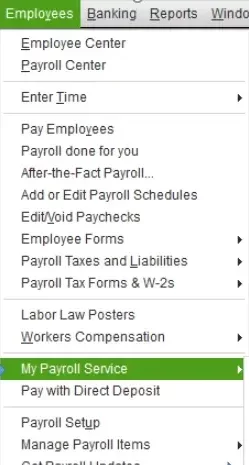
[Note: Make sure that you are on the latest version of QuickBooks Desktop (24), or the newest version of QuickBooks Desktop Enterprise Solutions (24.0) for downloading the tax table update.]
Things to Keep in Mind for QuickBooks Payroll Tax Table Update
Consider the aspects mentioned below before you download payroll tax table updates in QB Desktop:
- Before updating your tax table, make sure that you have an active payroll subscription. If you don’t, renew your payroll subscription.
- Check & verify that you have a stable internet connection before you begin with the payroll tax table update.
- Make sure that you have updated QuickBooks Desktop to the latest version.
- To get tax table updates in QuickBooks you must download and install the latest payroll update.
- If you want to get payroll updates in QuickBooks Desktop automatically, you have to turn on the automatic updates feature in your workstation.
- You should update the tax table at least every 45 days.
Now, we will go through the steps to update QB payroll.
Steps to Download Payroll Tax Table Update in QuickBooks
If you have not set up automatic updates in QuickBooks Desktop, you will need to download them manually. To do so, follow the methods mentioned below:
- Open your QB Desktop app
- Browse to the Employees menu
- Select Get Payroll Updates
- Now, select Download Entire Update

- Select Update
- Finally, press OK
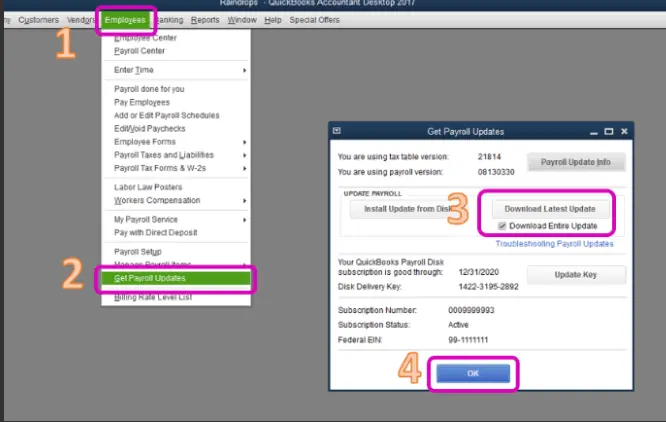
You’ll see an information window pop up after the download is complete. Following the steps mentioned above should download QuickBooks payroll update and install it to upgrade your tax table to the latest version.
What to Expect With the Latest Tax Table Payroll Updates
Version 12134003 is the latest QuickBooks Payroll tax table update released on QB Desktop 2024. It was launched on June 24th, 2025, and is effective from July 1st, 2025 to December 31st, 2025.
Below are mentioned the current & historical TD1, CPP, and EI amounts.
TD1 Amounts
| Effective Date | 1/1/2025 | 7/1/2025 |
| Federal | 16,129.00 | 16,129.00 |
| AB | 22,323.00 | 22,323.00 |
| BC | 12,938.00 | 12,938.00 |
| MB | 15,969.00 | 15,591.00 |
| NB | 13,396.00 | 13,396.00 |
| NL | 10,818.00 | 11,067.00 |
| NS | 11,744.00 | 11,744.00 |
| NT | 17,842.00 | 17,842.00 |
| NU | 19,274.00 | 19,274.00 |
| ON | 12,747.00 | 12,747.00 |
| PE | 14,250.00 | 15050 |
| QC | 18,571.00 | 18,571.00 |
| SK | 18,991.00 | 19,991.00 |
| YT | 16,129.00 | 16,129.00 |
| ZZ (employees outside Canada) | 0 | 0 |
Canada Pension Plan (CPP) – outside Quebec
| Effective Date | 1/1/2025 | 7/1/2025 |
| Maximum Pensionable Earnings | 71,300.00 | 71,300.00 |
| Basic Exemption | 3,500.00 | 3,500.00 |
| Contribution Rate | 5.95% | 5.95% |
| Maximum Contribution (EE) | 4,034.10 | 4,034.10 |
| Maximum Contribution (ER) | 4,034.10 | 4,034.10 |
Employment Insurance (EI) – outside Quebec
| Effective Date | 1/1/2025 | 7/1/2025 |
| Maximum Insurable Earnings | 65,700.00 | 65,700.00 |
| Premium EI Rate (EE) | 1.64% | 1.64% |
| Premium EI Rate (ER) (1.4*EE) | 2.30% | 2.30% |
| Maximum Premium (EE) | 1,077.48 | 1,077.48 |
| Maximum Premium (ER) | 1,508.47 | 1,508.47 |
Quebec Pension Plan
| Effective Date | 1/1/2025 | 7/1/2025 |
| Maximum Pensionable Earnings | 71,300.00 | 71,300.00 |
| Basic Exemption | 3,500.00 | 3,500.00 |
| Contribution Rate | 6.40% | 6.40% |
| Maximum Contribution (EE) | 4,339.20 | 4,339.20 |
| Maximum Contribution (ER) | 4,339.20 | 4,339.20 |
Employment Insurance (EI – Quebec Only)
| Effective Date | 1/1/2025 | 7/1/2025 |
| Maximum Insurable Earnings | 65,700.00 | 65,700.00 |
| Premium EI Rate (EE) | 1.31% | 1.31% |
| Premium EI Rate (ER) (1.4*EE) | 1.83% | 1.83% |
| Maximum Premium (EE) | 860.67 | 860.67 |
| Maximum Premium (ER) (1.4*EE) | 1,204.94 | 1,204.94 |
Quebec Parental Insurance Plan (QPIP)
| Effective Date | 1/1/2025 | 7/1/2025 |
| Maximum Insurable Earnings | 98,000.00 | 98,000.00 |
| Contribution Rate (EE) | 0.49% | 0.49% |
| Contribution Rate (ER) (1.4*EE) | 0.69% | 0.69% |
| Maximum Contribution (EE) | 484.12 | 484.12 |
| Maximum Contribution (ER) (1.4*EE) | 678.16 | 678.16 |
Commission des normus du travail (CNT)
| Effective Date | 1/1/2025 | 7/1/2025 |
| Maximum earnings subject to CNT | 98,000.00 | 98,000.00 |
How to Resolve QuickBooks Payroll Tax Table Update Issues
If the TD1 amounts you see after installing the QuickBooks Pro Payroll update remain the same, you must take the necessary steps to correct them. Check the following list to ensure any errors in your tax table:
- Begin with the effective date of the tax table update. For instance, if you downloaded the tax table update version 12134003 on June 25, 2025, it won’t come into effect until July 1, 2025.
- If you ever manually updated any TD1 amounts for any employee, updating the tax table won’t adjust the amounts you entered yourself. You have to update the amounts manually from that point.
- The payroll tax table update won’t take effect until you have restarted your QuickBooks Desktop application.
- You might have set some of your employees on the basic TD1 amount. QB Desktop will update the amount on its own for any employees with the basic amount in the previous tax tables.
While updating QuickBooks Payroll, you might face a 15XXX series error, such as error 15222.
Additionally, you can also face a 12XXX series error, like QB error 12152.
Updating Payroll Tax Table in QuickBooks – A Quick View
Below is given a table that contains a concise summary of this comprehensive blog on the QuickBooks Payroll tax table update.
| QuickBooks Payroll tax table update | It’s essential to update your QB Payroll tax table before you pay your employees to make sure you’re compliant with the latest Internal Revenue Service (IRS) and Tax agencies’ rules. This service is available with the QB Payroll subscription. |
| Latest tax table version | The latest Tax Table Version is 12134003 |
| How to update? | In your QBDT app, go to the Employees menu, and choose Get Payroll Updates. |
| Errors you can encounter | While updating the QB payroll, you can encounter the 15XXX series errors and the 12XXX series errors. Additionally, you can encounter issues like TD1 not updating. |
Summing Up
In this blog, we discussed why it is essential to update your payroll tax table in QuickBooks. Additionally, we also explained how to update the tax table and mentioned the troubleshooting methods for any errors you might face in doing the same. If you need any advice or are facing any issues that you’re unable to solve on your own, feel free to call our Proadvisor Solutions professionals today at 1-855-888-3080.
FAQs
How to get Payroll updates in QuickBooks Desktop?
To download the latest payroll updates in QBDT, navigate to the Employee menu and select Get Payroll Updates. Doing this would update your QB Payroll to the newest version. Restart your QBDT application for the changes to take effect.
What is the latest QuickBooks Payroll update?
The latest QB Payroll version is 22513, released on 3rd July 2025. This update is available to all QBDT users with a valid payroll subscription.
How to update payroll tax tables in QuickBooks?
To update the payroll tax table, you have to first navigate to the Employees section in the QBDT app, then click on Get Payroll Updates. To get the latest tax table, you have to first select Download Entire Update and then click on Update.
Does QuickBooks provide updates for the tax table?
Yes, QB regularly provides updates for the tax table to remain compliant with the ever-changing IRS rules and rules of other tax agencies. You need to have an active QuickBooks Payroll subscription in order to download the latest tax table updates.
Are tax code updates automatic in QuickBooks Online?
Yes, if you’re using the Online version of QB, you can enjoy the service of auto-updating tax codes when necessary.
How frequently should I update my tax table?
You should ensure that you update QB Payroll every month to update tax tables and remain aligned with the latest rules and regulations. Additionally, you should also check for any tax table updates before you pay your employees.
Read More Related Articles :
Solved: QuickBooks Payroll Not Updating In QB Desktop
QuickBooks Tax Table Not Updating? Here’s How to fix It
Try These Pro Tips To Adjust Payroll Liabilities in QuickBooks
How to Fix Payroll Mistakes in QuickBooks? (Answered)
What to do if QuickBooks Payroll not deducting taxes (Fixed)

Erica Watson is writing about accounting and bookkeeping for over 7+ years, making even the difficult technical topics easy to understand. She is skilled at creating content about popular accounting and tax softwares such as QuickBooks, Sage, Xero, Quicken, etc. Erica’s knowledge of such softwares allows her to create articles and guides that are both informative and easy to follow. Her writing builds trust with readers, thanks to her ability to explain things clearly while showing a real understanding of the industry.